For most technicians and field agents, writing intervention reports can feel like a tedious and time-consuming task. Yet, in many companies, these reports have become essential. Highly valued by clients, they also allow for better tracking of interventions and faster invoicing cycles.
To help you create effective intervention reports, here are the key elements to include and the best practices to follow.
First, the person responsible for field interventions should define the essential data needed to track activities. For convenience, here’s a summary of the most common information found in intervention reports. It’s also recommended to review this list with your clients and other company departments.
Essential information for every intervention report:
Company identity: logo, trade name, legal structure, registration number, address, and contact information.
Identification of the technician or agent in charge: name, surname, or ID number.
Client contact information and the relevant contact person for this intervention.
Reason for the intervention: e.g., dishwasher repair, fire extinguisher inspection, furniture assembly.
Precise geographical location of the intervention.
Start and end time or duration of the intervention.
Origin of the intervention: order reference, date of email or phone call, scheduled monthly maintenance, etc.
Client signature or stamp.
Including these mandatory fields reduces the risk of omissions and ensures that reports are factual and actionable.
Depending on your activity, the intervention report can include optional fields such as:
Internal reference numbers.
Vehicle registration and mileage.
Type of equipment or tools used.
Quantity of products consumed; stock levels to monitor.
Comments on the intervention or description of any anomalies.
Usage instructions or operational advice.
Date and type of next recommended maintenance.
Nature of tests or samples collected (for labs, for example).
These additional fields, which can be checkboxes, lists, or text areas, demonstrate professionalism and adherence to industry standards.
While no strict standard dictates how an intervention report must look, digitizing your reports offers numerous benefits. You can use paper forms, Word or Excel files, CRM systems, or mobile apps.
Automated report generation: real productivity gains
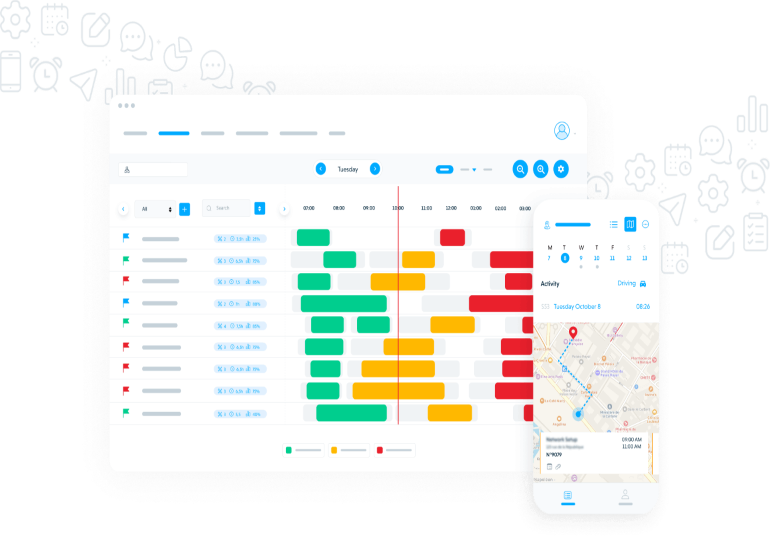
By having agents fill out reports via a mobile app, you save significant time. No more deciphering illegible handwriting or chasing lost documents. Software like AntsRoute allows you to generate intervention reports in just a few clicks. When exported as a PDF, the information collected by agents is automatically integrated without manual data entry.
Adding photos to intervention reports
Many delivery or field management software solutions allow photos to be attached to reports. This is useful to prove, for instance, a client’s absence or the good condition of goods, helping prevent disputes and complaints.
Integrating electronic signatures
Digital reports also allow for electronic signatures. Mobile-friendly, this proves an operation was completed even before the agent returns. Digital archiving, storage, and organization of reports are far easier than with paper.
Automated reports can be sent to clients quickly and accurately. But internal teams also benefit:
Sharing with clients
Reports can be converted to PDF and sent immediately, reinforcing client trust and reducing the risk of lost or stolen documents.
Improving after-sales service
Electronic intervention reports make it easier for after-sales teams to handle repeated visits. All intervention details are centralized in the software, making it easy to track a client, courier, or maintenance agent history. Teams can quickly see:
Types of operations performed.
Names of technicians involved.
Issues encountered and solutions applied.
Intervention comments, etc.
Leveraging data across departments
Solutions like AntsRoute allow seamless sharing of field data with other company systems. For example:
Using Zapier, AntsRoute can connect to accounting software like QuickBooks, automatically updating intervention data with each new invoice.
With Odoo, a new order in Odoo can automatically generate a corresponding intervention or delivery project in AntsRoute.
These integrations reduce duplicate data entry, boosting productivity and efficiency.
If managing intervention reports takes too much time, you can try AntsRoute with a 7-day free trial, no credit card required, to experience optimized maintenance or delivery scheduling firsthand.

















































































































 January 26, 2026 - BY Admin